Agents
An agent is the software you install on your own network. It's what actually answers DNS queries and hands out DHCP leases — Subnetly's control plane manages configuration; the agent does the serving.
Open the Agents page from Infrastructure → Agents.
In this section
- Deploy an agent — install on Linux, Windows Server, Docker, Kubernetes, or VMware.
- Agent lifecycle — enrollment, connection status, events, certificate rotation, and removal.
- Configuration & roles — per-agent DNS/DHCP server settings and zone/scope deployment roles.
- Windows migration — move DNS/DHCP off Windows Server onto Subnetly-managed agents.
How agents work
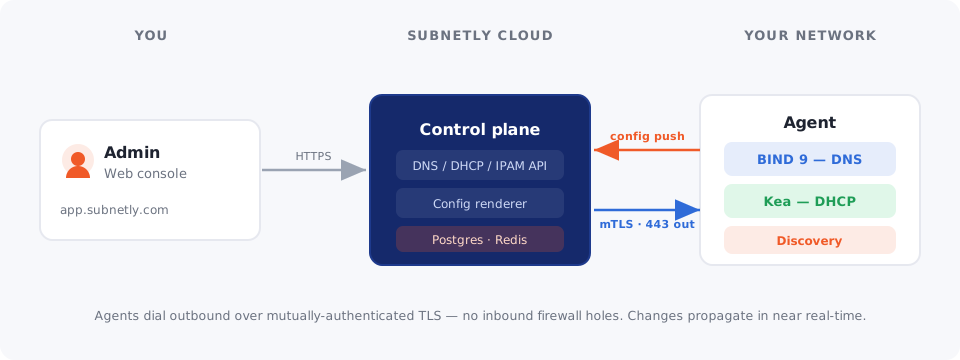
- Outbound only — the agent dials the control plane over mutually-authenticated TLS (mTLS) on TCP 443. No inbound firewall rules are needed.
- Near real-time config — when you change a zone, record, scope, or reservation, the control plane pushes a fresh configuration snapshot; the agent applies the difference locally.
- Self-upgrading — Linux deployments and the Windows agent keep themselves up to date automatically.
- Site-scoped — an agent serves the configuration for its assigned site, plus anything marked global.
Runtimes
| Platform | DNS | DHCP | Notes |
|---|---|---|---|
| Linux | ISC BIND 9 | ISC Kea | Containers; choose services at deploy time |
| Windows Server | Native DNS role | Native DHCP role | Drives and inventories the built-in roles |
| Docker / K8s / OVA | BIND 9 | Kea | Single container, DaemonSet, or VM appliance |
Quick tasks
| I want to… | Go to |
|---|---|
| Install my first agent | Deploy an agent |
| See why an agent is offline | Lifecycle & events |
| Set recursion/forwarders on an agent | Configuration & roles |
| Make an agent a primary/secondary for a zone | Zone deployments |
| Move off Windows DNS/DHCP | Windows migration |