Subnetly Documentation
DNS, DHCP & IPAM, run from one console
Subnetly manages your network's DNS, DHCP, and IP address space from the cloud, while lightweight agents on your own network do the serving. Set it up in minutes — no inbound firewall changes required.
Start here
- Create your account and sign in to the console.
- Learn the core concepts — tenants, sites, agents, zones, scopes, and subnets.
- Run the Startup Wizard to build your first site, network, DHCP scope, and DNS zone.
- Deploy your first agent so DNS and DHCP start serving clients.
Explore the documentation
Getting Started
Account setup, key concepts, the Startup Wizard, and your first agent.
DNS Management
Zones (forward, reverse, forwarder, secondary), records, public DNS, firewall, ACLs.
DHCP Management
Scopes, reservations, options, live leases, and high-availability failover pairs.
IPAM
Subnet containers and networks, IP tracking, split/merge, and inherited options.
Network Intelligence
Discovery, the Advisor, risk score, health checks, Live Docs, and reports.
Agents
Install, enroll, configure, and migrate agents — Linux, Windows, Docker, K8s, OVA.
Sites
Group resources by location and scope exactly what each agent serves.
MSP Guide
Multi-client management, per-client workspaces, reports, and webhooks.
Settings & Administration
Users and roles, billing and usage, SSO, the audit log, and import/export.
API Reference
REST conventions, authentication, tenant scoping, and resource endpoints.
How Subnetly works
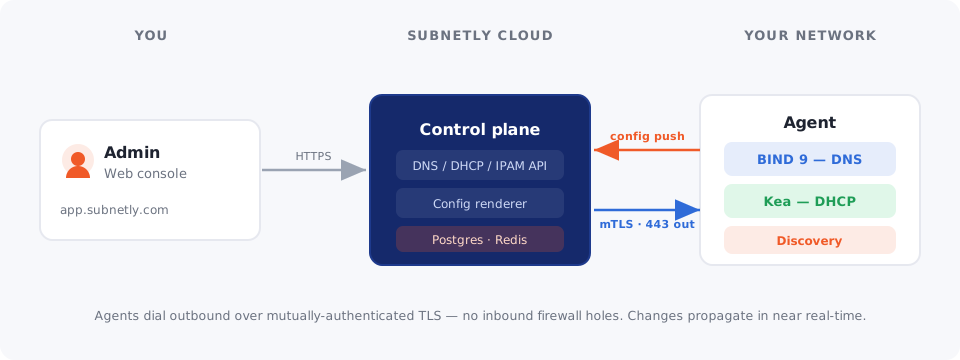
- A tenant is your organization's isolated workspace.
- A site is a location; you scope zones, scopes, subnets, and agents to it.
- An agent runs on your network and does the actual DNS/DHCP serving.
- You define zones, scopes, and subnets; Subnetly renders and pushes the config.
New here? Start with Getting Started.